So I thought this was commonly known internet navigation (but apparently it might just be those of us who have been using the internet since the 90’s who still know it). Or so it seems based on… a grumpy comment I got.
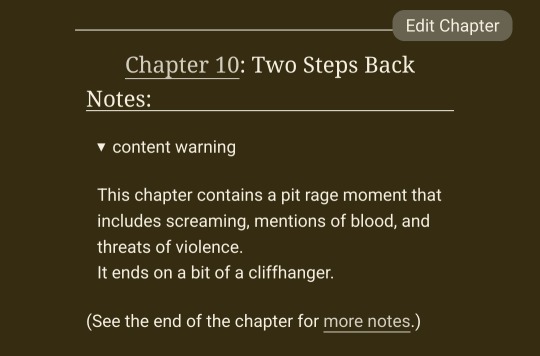
When you see an arrow like this:
It means you click it to expand out a hidden section.
It’s an accordion section/menu! It’s useful in web design to hide information that may be overwhelming under specific headers so people can only see what they need.
Here I’m using it for people who need the content warnings to be able to check, but for those who don’t need them and don’t want to be spoiled to just move right past without accidentally reading anything.
It’s still the user’s responsibility to click the arrow and read things as they need! But it is all warned. (And, yes, the all encompassing issues are already a tag on the fic, I’m just providing additonal warnings per chapter.)
Ah, sorry yes! For those who want the html, it’s the details and summary tags!


 amhrancas